Getting Started in Mini Legends Idle
A calm first-hour plan for the Steam launch of this voxel idle RPG.
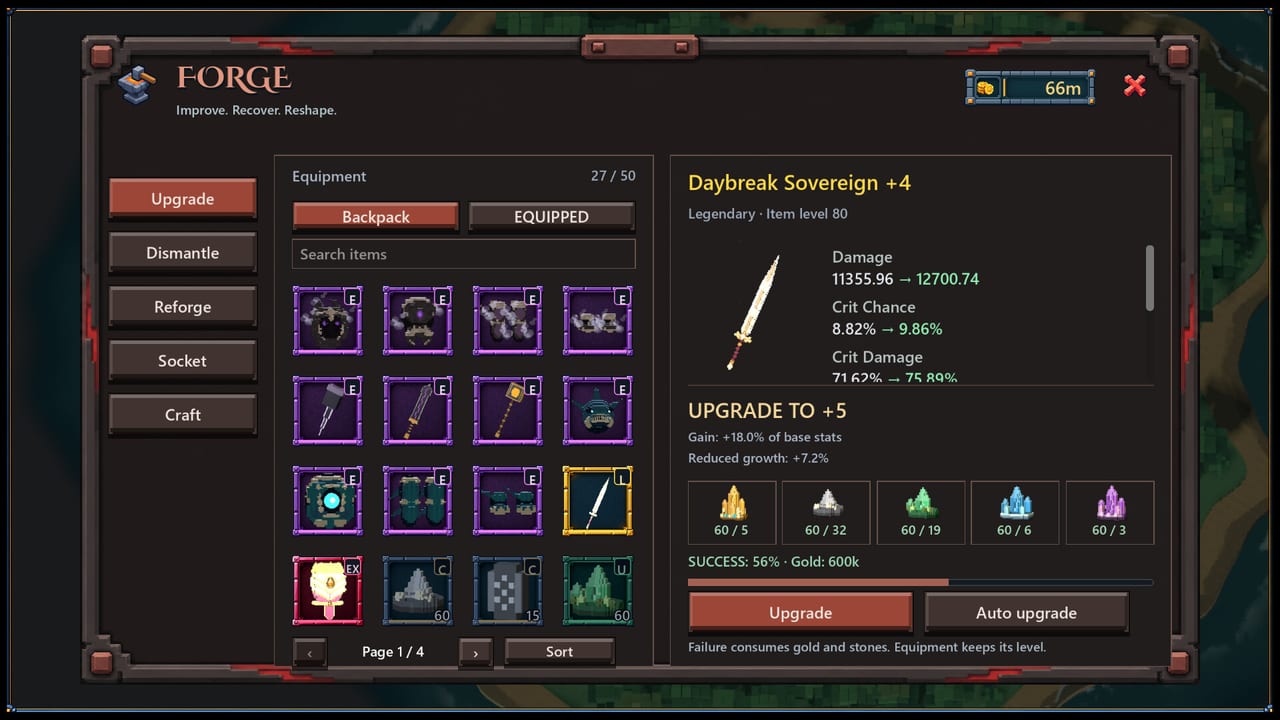
Mini Legends Idle is a free-to-play voxel fantasy idle RPG from Reysher Games. Your hero fights automatically while you choose zones, sort loot, upgrade equipment at the forge, and unlock spells. This getting started guide is written for players who just clicked Play on Steam and want a clean path through the first session.
Before you hit Play
Confirm you meet the minimum setup: Windows 10 64-bit, a dual-core 2.0 GHz CPU, 4 GB RAM, Intel HD Graphics 4000-class GPU or better, about 2 GB of storage, and OpenGL 3.3 drivers. The Steam listing also requires a persistent internet connection and a Steam account, so treat this as an always-online idle game rather than a pure offline clicker.
Install from the official Steam store page, then join the developer Discord from our Links Hub so you can catch hotfix notes and any promo codes. If you care about free rewards, bookmark the Codes page as well.
First ten minutes
Complete the onboarding prompts without rushing past tooltips. The game teaches zone selection, auto-combat, and the idea that loot and gold feed the forge. Your job in minute one is not to min-max every passive; it is to get a stable farm running.
Pick an early zone your hero can clear without constant deaths. Idle progress collapses if the run stalls on a pack that outgears you. Watch a few kill cycles, then open inventory and equip the highest-impact weapon and armor pieces you already understand. Swords, axes, scythes, and katanas each hint at different pacing — for the first hour, prioritize reliable damage and survivability over exotic effects you have not tested.
First-hour priorities
- Keep auto-combat running in a zone you can finish.
- Sell or stash junk so inventory stays readable.
- Visit the forge when you have a clear upgrade candidate.
- Put basic potions or buffs on the quick bar and decide which ones should fire automatically.
- Note which passives appear on armor so you can compare them later on the armor tier list.
Avoid spending scarce upgrade resources on every white or green drop. Launch-week inventories fill quickly, and the forge guide explains why waiting for a piece with a useful passive often beats upgrading the first epic you see.
What the playtest footage teaches
The embedded playtest video shows the idle fantasy loop in motion: voxel environments, automatic fights, and the constant drip of equipment decisions. Use it to recognize UI panels before you need them under pressure. After watching, return to How to Play for a written breakdown of the same loop.
Common launch-week mistakes
Skipping the forge until you feel stuck. Small, timely upgrades often unlock the next farm bracket faster than raw grinding.
Pushing zones for ego. If clear speed collapses, drop back one stage and rebuild materials. Zone Progression covers how to spot a soft wall.
Ignoring spellbooks and passives. Weapon damage is only part of the kit. Spells and Passives matters as soon as rare books appear.
Expecting Steam Market trading on day one. Community Market support is planned and not yet available. Do not stall your account waiting to flip items.
Reading only outrage reviews. Early Steam scores can swing hard on a brand-new free-to-play title. Use reviews to spot friction, then verify systems yourself with the beginner checklist.
A simple day-one plan
Morning or first session: install, clear tutorial zones, equip best-in-slot basics, set potion automation. Mid session: learn forge costs on one weapon and one armor piece you intend to keep. Evening: park the hero on the highest zone that still feels efficient, then review drops against the weapon tier list and build archetypes.
When that loop feels natural, graduate to farming schedules on Farming Priorities and keep an eye on Launch Notes for post-release patches.
Sibling guides worth opening next
- How to Play — full core loop
- Forge and Upgrades — material discipline
- Spells and Passives — build identity
- Zone Progression — map pacing
This getting started page is your on-ramp. Everything else on the wiki assumes you can keep a farm alive and know where the forge lives.
Frequently Asked Questions
Quick answers to the most common questions.
Is Mini Legends Idle free to start?
Yes. It is listed as Free to Play on Steam. In-app purchases exist, but this guide focuses on progress available without spending.
Can I play Mini Legends Idle offline?
No. The Steam requirements call for a persistent internet connection and a Steam account.
What should I upgrade first?
Upgrade a weapon you will keep for the next few zones, then an armor piece with a passive you understand. Details are in the forge guide.
Where do I find codes?
Watch the official Discord and our Codes page. Launch weeks sometimes add promo redemptions with little notice.